












2014 ISSM Workshop
The 2014 ISSM Workshop took place on 2-4 June 2014, at the Bjerknes Centre for Climate Research at the University of Bergen, Bergen, Norway
The ISSM 2014 workshop was a great success! Many thanks to the participants and to our hosts at The Bjerknes Centre for Climate Research at the University of Bergen. A summary of the workshop has been published in the November 11th 2014, issue of EOS.
The Bjerknes Centre for Climate Research at the University of Bergen in collaboration with the NASA Jet Propulsion Laboratory proudly hosted the 2014 Ice Sheet System Model (ISSM) Workshop. The workshop took place at the Bjerknes Centre for Climate Research at the University of Bergen, located in Bergen, Norway, from Monday, June 2nd to Wednesday, June 4th, following the IGS conference in Chamonix.
Interactive sessions were offered for beginners/advanced users and developers interested in learning how to use ISSM. Updates to ISSM since the 2012 workshop, including user-requested features (i.e. a new Python port, support for new OS/Platforms, etc) were presented. Also, participants were invited to showcase their work during an open poster session.
A limited amount of travel support was provided by CliC (Climate and Cryosphere) to help students or early-career scholars attend the workshop. Application for travel support is now closed. In addition, there was no fee for participation in the workshop.
We are happy to report that the workshop generated fruitful interactions between our team, the growing community of ISSM users, and the broader cryosphere community.
Thank you for your participation!
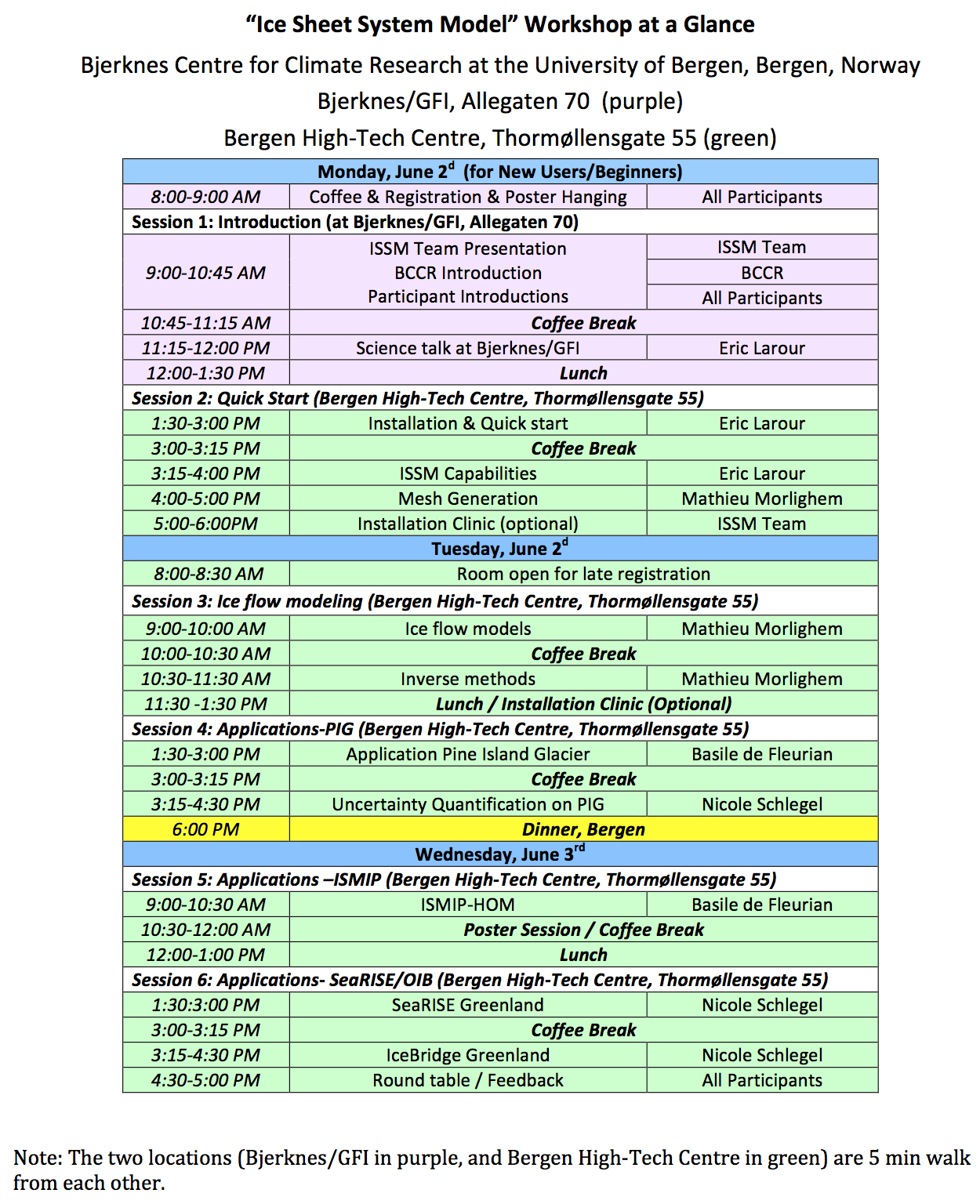
The workshop took place at the Bjerknes Centre for Climate Research, University of Bergen, in Norway. We were in the "Datalab 1107", on the ground floor of Bergen High Technology Centre (Building 1 in the campus map).
We thank the CliC project for providing support for students from around the world to participate in the ISSM workshop!
You can download the workshop directory that accompany these tutorials above (Tar File, 56 KB) .
Unzip and untar the workshop directory. Inside, you will find a Data sub-directory. Run the Download.sh script within the Data directory to automatically download data required by various tutorial steps.
Many of the tutorial presentations reference files within the workshop sub-directories. For each tutorial, you should work within the sub-directory that shares the same name as the tutorial.
CL#26-2815