




















Satellite Data Explorer
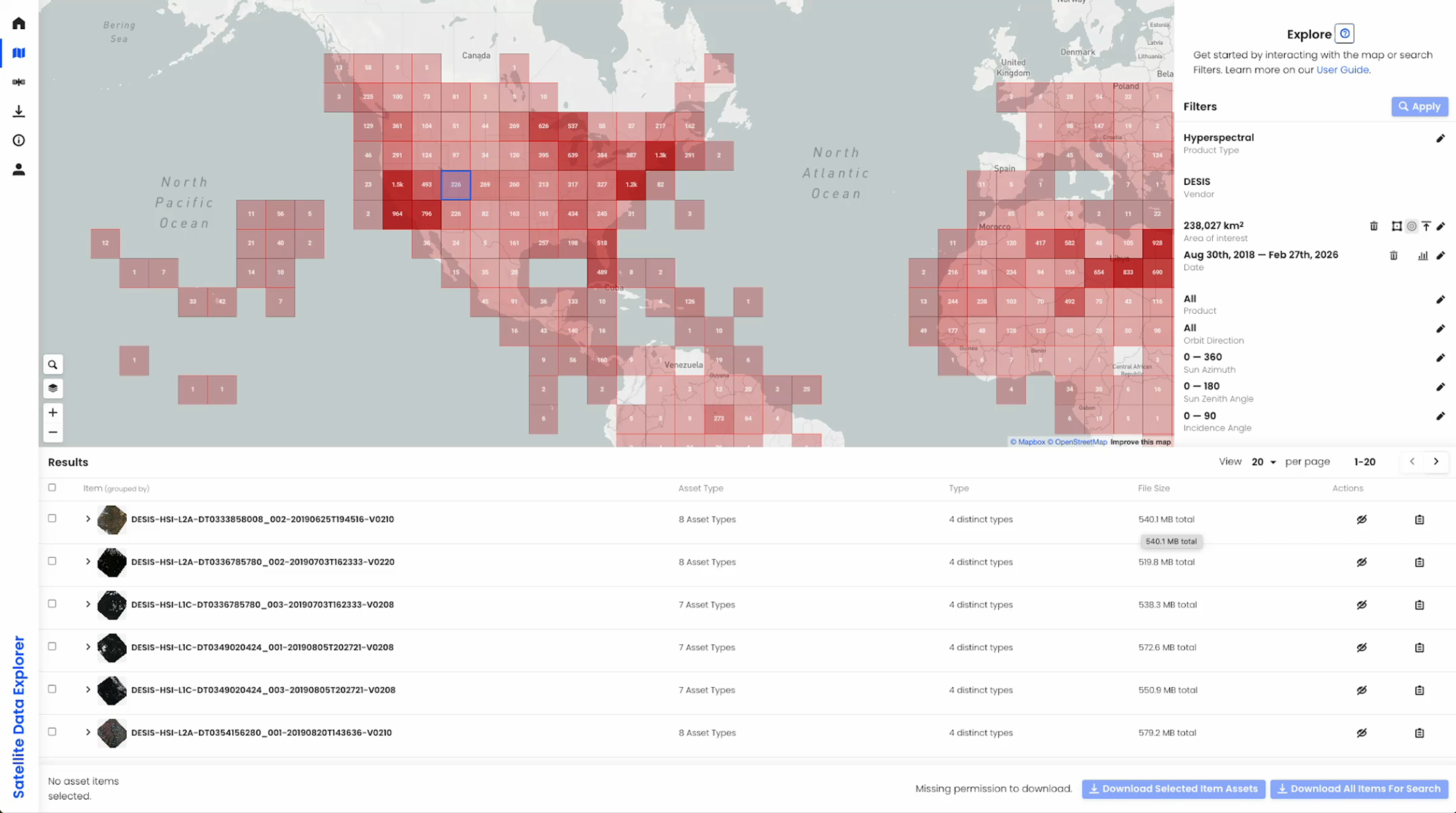
The Satellite Data Explorer (SDX) from NASA’s Commercial Satellite Data Acquisition (CSDA) program is a web-based data discovery and data access tool that allows approved users to search, discover, access, task, and download commercial Earth Observation data the CSDA Program has acquired from its commercial partners.
Through SDX, users can quick browse and visualize scene thumbnails for satellite imagery data and point icons for Global Navigation Satellite System (GNSS) science data, filter data searches by product type (e.g., imagery or DEMs), date, and area-of-interest, download data through an updated and streamlined interface (authenticated users only), access CSDA’s new Data Acquisition Request System for acquiring tasked (or yet to be collected) data, consult the SDX User Guide, and more.
Key Features
- Navigation Panel—Facilitates fast navigation between the Welcome, Explore, Downloads, and User Guide as well as a link to the user login interface.
- Spatial Filtering— Users can draw an area-of interest (AOI), upload a GeoJSON AOI file, or enter geographic latitude/longitude coordinates.
- Temporal Filtering—Filter by a date or range of dates for available data.
- Filter by Product Type—Allows users to select the vendor collection type (e.g., imagery, GNSS science data, DEM, SAR, etc.)
- Filter by Metadata (product dependent) — Users can apply metadata filters like data resolution, instrument mode, orbit direction, track number, instrument type, polarization and quality flags like cloud cover.
- Ability to Submit and Track Proposals for Data Tasking—enables approved users to submit and track Proposals for yet-to-be-collected data from CSDA’s commercial partners.
- Quick View—The tool supports quick browse and visualization of scene thumbnails for satellite imagery data and point icons for GNSS science data within the Map Display pane.
- Automated Quota Tracking —user download quotas are enforced in real-time by the SDX; the user can view details on their remaining quotas.
- Coverage Map —provides users with a high-level visualization of the spatial coverage of data discoverable through the SDX for any specified month and year.
How to Access the Data
Step 1: To use the SDX, you will need an Earthdata Login to request data. If you don’t have one, visit the earthdata website.
Step 2: Request data access by completing the authorization request form.
Step 3: Once approved, users will receive access instructions. Users can then search for and request data using the Satellite Data Explorer (SDX).
Requirements for Ordering Data Through SDX
To order data from SDX, users must create an account with and be logged in to NASA Earthdata. The initial attempt to use SDX will redirect the user to Earthdata Login, where they will be prompted to enter Earthdata credentials and accept an End User License Agreement (EULA). Users must agree to the terms of the EULA before any data can be ordered. Data will be made available for download upon approval and acceptance of the EULA. As additional commercial datasets are evaluated and acquired, these datasets will also be made available.
Need Help?
Email Support: csda-support@nasa.gov
NASA Earthdata Forum: https://forum.earthdata.nasa.gov
Subscribe to receive program announcements: csda-program-news-join@lists.nasa.gov